Stephen Purdue
Software Engineer

Hi, I'm Stephen Purdue. I've been studying as a Game Developer for the last 4 years working in Unity and Unreal Engine, I'm learning Python, JavaScript, and React in order to pursue a career in Software Engineering. I am passionate about solving problems and understanding new programming languages. While my core skill set is Game Development, I have found a love for Machine Learning and Artificial Intelligence. Learning new technologies is always an exciting opportunity and I enjoy building new things with them.
University Projects
Client Project: 'Slackers'
Semester 1 - 2025
Open
Client Project: 'Slackers'
Semester 1 - 2025| Student Name: | Stephen Purdue |
| Student ID: | 2301815 |
| Course: | BSc, Computer Games Design & Development |
| Module: | DM3108 - Negotiated Design Placement |
| Word Count: | 4796 |
| Date of Submission: | 16/01/2026 - Before 12:00pm |
Project Brief
Images will open in a separate tab if clicked on!
The project 'Slackers' is a brief given by RaRa Games in response to DM3108 - Negotiated Design Placement. It explores a unique game concept involving disguised aliens within human workplaces. The objective is to create a prototype that uses a gameplay loop centred around chaos and sabotage, similar to Among Us (InnerSloth, 2018).
This prototype game will focus on a well-created mechanic, such as sabotage actions, enemy chasing, or the ability to change disguises. Players will navigate a small environment, such as an office, completing 'actions' and remaining anonymous to the AI.
The primary goal is to develop an MVP vertical slice, featuring core features that can be expanded upon in next semester's final project. This project will be created using Unity, and both a game design document and a Kanban board will be utilised to track the development cycle and manage time throughout the module. This development cycle strikes a balance between needs and wants, promoting sustainable choices that align with Sustainable Development Goal 12 (United Nations, 2024) by encouraging responsible production and development.
The brief provided was open to interpretation, and left workplace setting selection to developers, specifying the game should involve disguised 'aliens' within human workplaces, with chaos and sabotage mechanics. This presented me with an opportunity to express creative freedom, allowing me to select an environment which would best convey my design methods, making use of available assets. Initial ideas focused on the most obvious interpretation, an office environment with direct office culture and sabotage opportunities (coffee machines, printers, and computers).
However, two key factors caused a shift towards a more open environment.
- Asset Availability: The Tiny Swords asset pack had a cohesive art style, contained medieval fantasy sprites perfect for my idea, rather than modern office assets, and was license-free.
- Environmental Complexity: Office environments take time to create well; this would have involved much more asset placement than was used in the finished slice, and would have lowered the amount of time to be spent on polished mechanics.
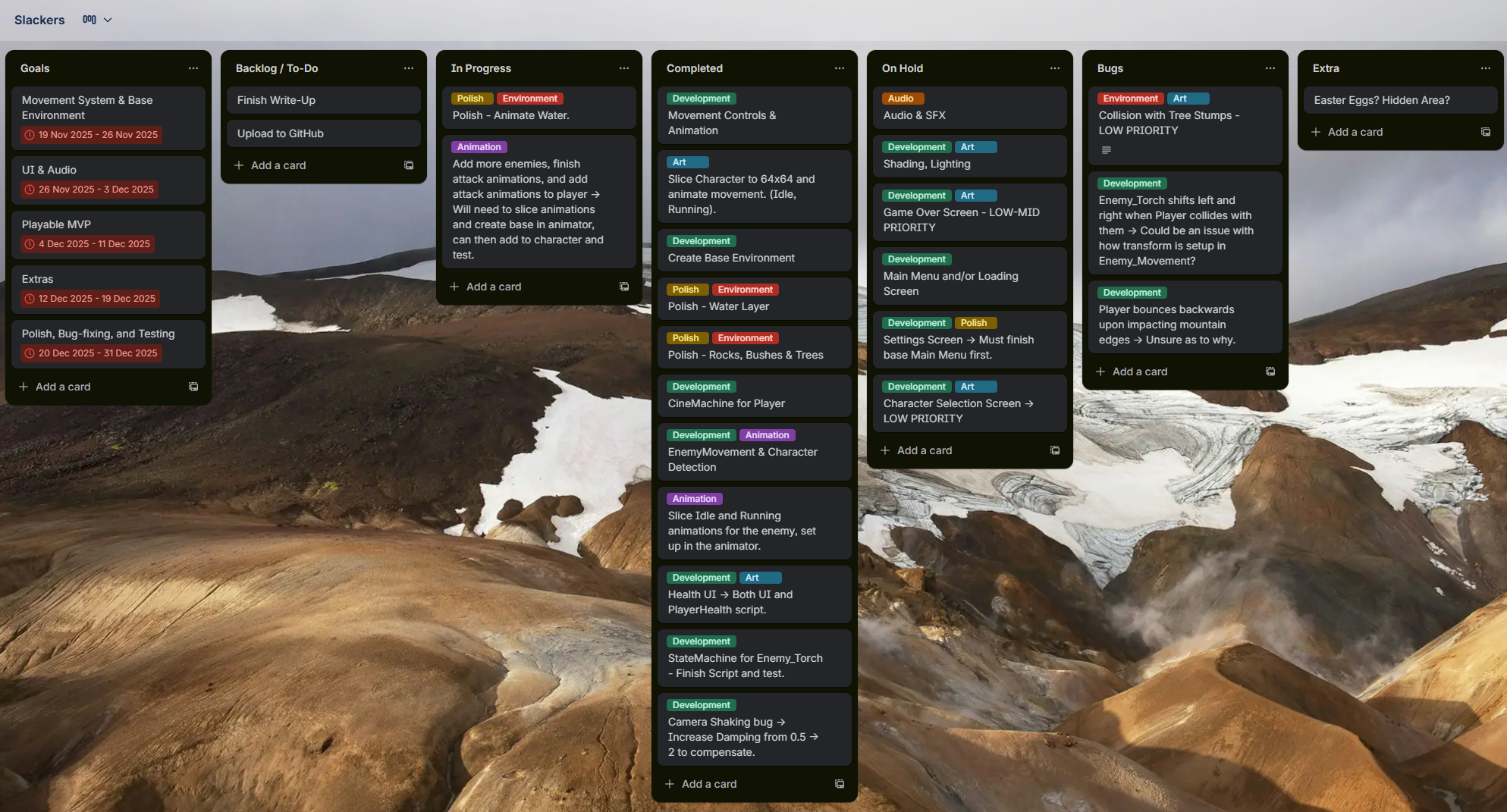
Trello Board: https://trello.com/b/KgaZg9SP/slackers
Contents
- Pre-Production
- Research
- Development
- Summary
- References
Research
Before beginning development, I conducted a comparative analysis of current titles in the chaos gameplay genre to identify design patterns that create engaging player experiences. This research went on to directly inform design choices and assets used in development.
Chaos & Sabotage Mechanics
The chaos gameplay genre relates to games in which player actions create disorder and escalating chaos, which have a direct impact on the world. Three games stood out for understanding how these mechanics function successfully: Among Us (InnerSloth, 2018), Overcooked (Ghost Town Games, 2016), and Untitled Goose Game (House House, 2019). Each of these games has a different approach to chaos systems, offering distinctly different gameplay and lessons that can be applicable to Slackers.
Among Us shows how sabotage can serve multiple purposes beyond immediate disruption. For example, when a player sabotages oxygen or lighting systems, both environmental and social chaos are created. The affected systems need to be fixed, and crew members must decide whether to call an emergency meeting or continue with tasks, weakening group coordination and potentially leading to further chaos. Critically, Among Us sabotage actions rely on cooldown timers to prevent overuse and encourage more strategic timing, which can have a direct impact on certain events. The game's success shows that sabotage gameplay remains engaging, despite there being only six sabotage actions, provided that each is used strategically. For Slackers, this informed my decision to create one or two well-polished mechanics, rather than numerous weak ones. This reinforces the idea of creating a polished vertical slice, rather than a weaker full title.
However, Among Us mostly relies on social deception between other players, translating this into a single-player game required a look at how chaos can function without social dynamics. Overcooked informed how cooperative chaos can function through environmental design rather than deception alone. Overcooked creates disorder through time pressure and spatial constraints; players must navigate through tight environments while managing multiple tasks on a strict schedule (Ghost Town Games, 2016). This game compounds simple mechanics into complex situations by layering them together with added pressure from a timer. I read into the (MDA) Mechanics, Dynamics, Aesthetics framework, where simple mechanics, such as chopping vegetables, produce dynamics such as team coordination, to generate the aesthetic experience fast paced cooperation (Hunicke et al. 2004)
This helped to inform Slackers, as it was clear that sabotage mechanics should have cascading effects and consequences, rather than isolated ones. For example, interacting with an item in-game shouldn't only create audio and visual effects, but also attract nearby enemies. This opens up room for secondary sabotage opportunities and experimenting with various mechanics to have intentional and unintentional gameplay effects.
Untitled Goose Game gave insight into how sabotage works in asymmetric power dynamics. The player runs within systems designed to constrain them, eg, gardens have fences, and shopkeepers will chase intruders, etc. This creates satisfying gameplay because the player operates from a position of weakness, allowing for satisfying and hilarious in-game actions, such as stealing a rake, prompting a response from an NPC, and turning a simple interaction into comedic sabotage.
This informed Slackers' AI system; the player isn't more powerful than enemies to the point where it isn't engaging. Tension is created by avoiding detection while completing objectives. Schell's Lens of Challenge states that difficulty should arise from making decisions under pressure and adapting to ongoing changes (Schell, 2008). Slackers utilise this by having NPC patrol routes, allowing players to time decisions and actions.
Stealth & Detection Systems
Implementing an effective AI detection required understanding how stealth games balance visibility, tension and player autonomy. Traditional stealth titles such as Metal Gear Solid employ cone-of-vision mechanics where players are detected when entering an enemy's sight range, which is typically visualised by an on-screen indicator. This provides clear feedback about hostile areas, allowing players to make informed decisions, rather than guessing what triggers detection.
These insights directly informed the detection system used in Slackers, as detailed in the development section's AI Detection System breakdown.
Production
During this vertical slice, I played the role of both Game Developer & Producer, guiding both the development and production of the entire product. This allowed me to create assets and systems on a schedule that worked for me, and I was able to maintain a level of control over all aspects of development.
Ethical & Sustainable Considerations
Throughout production, I aimed to link closely to the Sustainable Development Goals by following these key steps:
- Reusing and adapting assets, rather than creating new ones, saves 20 - 40 hours of complete asset creation.
- Prioritising industry-standard coding practices to ensure low impact.
- Avoiding inflation of certain features to keep the game clean.
- Ensuring the game didn't have any harmful stereotypes and making sure the game was open to everyone was achieved by keeping the game purely fictional.
Development prioritised code reusability to minimise technical debt; this involved using inheritance so that core interaction logic didn't have to be rewritten for certain aspects of the slice. These steps helped ensure alignment with the ethical values and qualities of game development, as outlined throughout the SDGs.
Reusing assets in the Tiny Swords pack eliminated approximately 20-40 hours of custom sprite creation and learning; this also reduces computational resources used in asset creation and development. This decision aligns with SDG 12.2's principle of sustainable resource management.
However, time constraints led to technical debt that will require future changes. Some values were hardcoded, such as damage numbers and flipping scales. This could create a future burden to development and maintenance should this slice be taken further. Code documentation in GitHub and Unity lacks sufficient information for external developers to understand how I worked, which could slow down future collaborative development.
Creating comedy about workplace environments and sabotage has ethical risks that require consideration; some harmful stereotypes could have been insinuated had I gone with a typical office environment. Therefore, I chose to go for an absurd medieval theme with no distinguishable stereotypes.
Needs vs. Wants
| Need/Want | Why? | Status |
|---|---|---|
| AI Chase Mechanics (Need) | Part of the core gameplay loop. | Completed |
| Health System (Need) | Visualises consequences of detection. | Completed |
| Disguise System (Need) | Core brief requirement. | Completed |
| Sabotage System (Need) | Core brief requirement. | On-Hold |
| Tutorial System (Want) | Critical to player accessibility, but not as important as core requirements. | On-Hold |
I had initially set the Tutorial as a need and was to be one of the first aspects of the game completed after the core gameplay loop. However, since the game was only a vertical slice with only one or two mechanics, I included on-screen queues to help with accessibility, removing the need for a tutorial.
Time Management
Game development is a complex process, requiring meticulous detail and extreme flexibility. I chose to use a Kanban, which uses online planning tools such as Trello to manage tasks and track progress (Atlassian, 2024). I felt this was the best option for time management, as it uses a visual interface to track every aspect of the game development cycle. Kanban was chosen rather than Scrum because it gave a more visual structure for planning development, which is beneficial for a solo developer. Once the board was created, I added different categories, setting the primary focus on building a working product before addressing any bug fixes or further development. This ensured a prototype could be created much quicker, leaving more time for adding extras and fixing any bugs. This structure allowed for an organised and clear workflow that ensured smooth production and is similar to industry-standard planning.
The board was split into 7 columns:
- Goals - Important tasks critical to the MVP.
- Backlog / To-do - All important development tasks ranging from research to testing.
- In Progress - Tasks that are currently being completed.
- Completed - Tasks that were completed and no longer in development.
- On Hold - Tasks that couldn't be completed pending other features.
- Bugs - List of bugs yet to be fixed, and logged during playtesting.
- Extras - Smaller features to be added if there was any time left over.
The most important task was identifying current bugs and backlog of tasks, which required an immense amount of time testing the game, each mechanic and reviewing all scripts and assets to ensure they worked as intended.
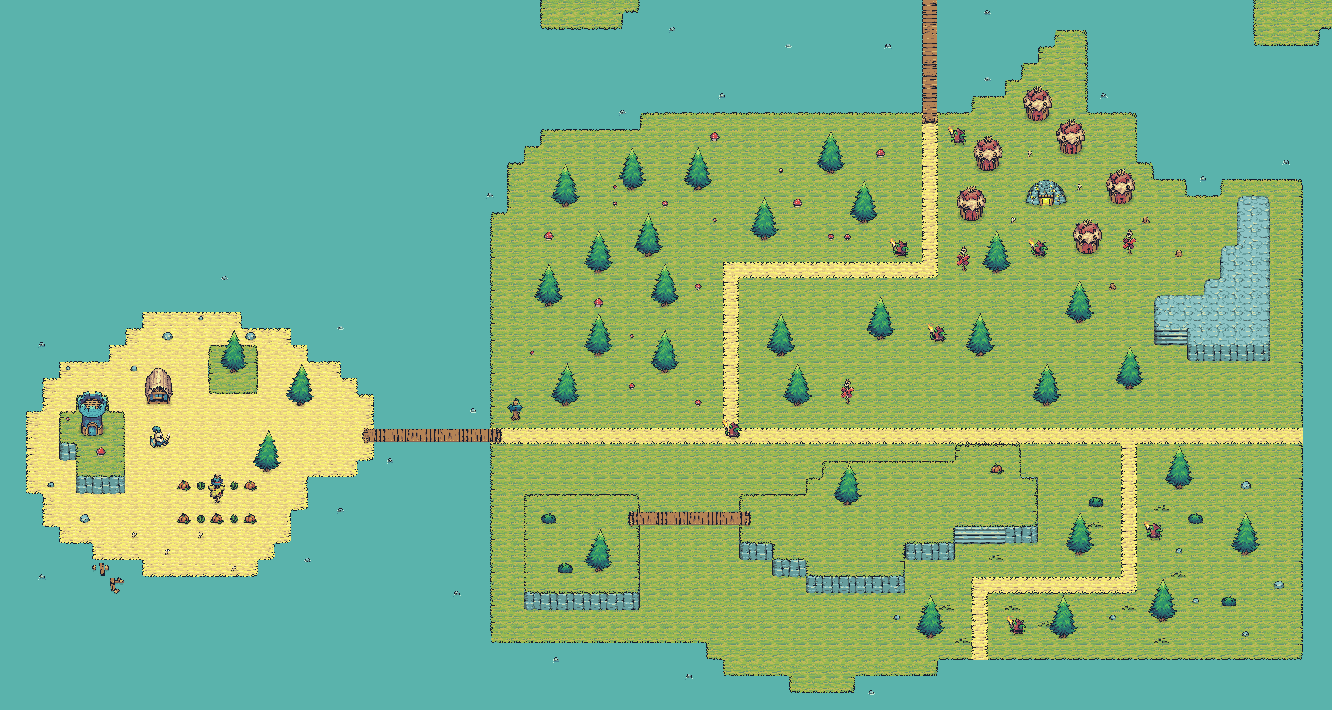
MVP Scope
Before starting the development process, I set out goals for the Minimum Viable Product. This was an important stage of production that involved analysing the client brief and highlighting essential mechanics that required high priority. This ensured there was a playable prototype. The purpose of creating the MVP was to capture the game's core mechanics in a clean and polished playable slice. This included systems such as 'Sabotage' or 'Destroy', as well as basic enemy AI detection, to add some challenge.
Throughout the development pipeline, I revisited the brief and constantly evaluated whether the slice I was creating met all the key criteria. If it didn't, I stopped to figure out why and made changes accordingly, ensuring that the client brief was met.
Game Design Document & GitHub
During development, I kept track using a comprehensive game design document, which contains all relevant information about the vertical slice, such as UI, enemy interactions, and audio; this was important so the project could stay on track, allowing time for bug fixing and extra details.
The game design document can be viewed here.
GitHub was also used as a backup for storage and version control. I felt this was more efficient than Unity Version Control, as I am more familiar with Git; this also acts as a 'portfolio' to showcase the project to other developers.
The GitHub repository can be viewed here.
Communication
Given the independent nature of the brief, formal client communication outside of development was limited. To help compensate for this constraint, I used self-evaluation at regular intervals to assess my progression and time management. This involved regular playtesting to identify and eliminate bugs, as well as ongoing review of the brief to ensure alignment with client needs and requirements.
Tutorial sessions over the semester enabled me to ask questions about the brief and receive suggestions as to what to implement and how this could be achieved; these focused on technical aspects rather than specific design questions or pointers.
The primary limitation of communication as an absence of engagement with the client (RaRa Games). Typical practice requires regular checkpoints and discussions in order to ensure the product meets client expectations, needs, and wants.
Accessibility
Accessibility was an important consideration throughout the design and development of Slackers. Although it wasn't a high priority, it was tackled through using clear visual communication practices, a readable user interface design, and simple interaction systems to ensure the game was easy to play and open to all players.
High contrast colours and a consistent art style were used to increase visual clarity and ensure complete visibility. I chose to keep the user interface as text to ensure it was visible against the bright background. The characters and NPCs are also clearly distinguishable from each other through different colours and sprites.
The disguise system also increases overall accessibility by providing players with a forgiving stealth mechanic, changing disguises resets enemy detection states, allowing players to recover from mistakes rather than facing repeated failure. This supports inclusive play by reducing difficulty, aligning with Schell's lens of challenge, which says that meaningful decision-making is favourable over mechanical punishment.
However, several accessibility concerns remain due to time constraints and the overall scope of the brief. The game doesn't have any changeable colourblind, difficulty or audio settings, as well as lacking rebindable controls. Additionally, font size and UI scaling are fixed and cannot be changed; this could present barriers for some users.
Future development would benefit significantly from adding accessibility earlier in the development pipeline, rather than leaving it until last. Improvements would include an adjustable difficulty setting, remappable controls, and scalable UI components. This could involve accessibility beta testing with a diverse group to determine what features are a priority and should be added first.
Development
When starting the project, one of the most important early decisions involved selecting the right visual assets. For this project, I chose to use the 'Tiny Swords' asset pack found on itch.io, a platform for indie developers to share assets. This pack stood out because of its beautiful art aesthetic, ideal for slackers. This pack was free and did not require any artist accreditation.
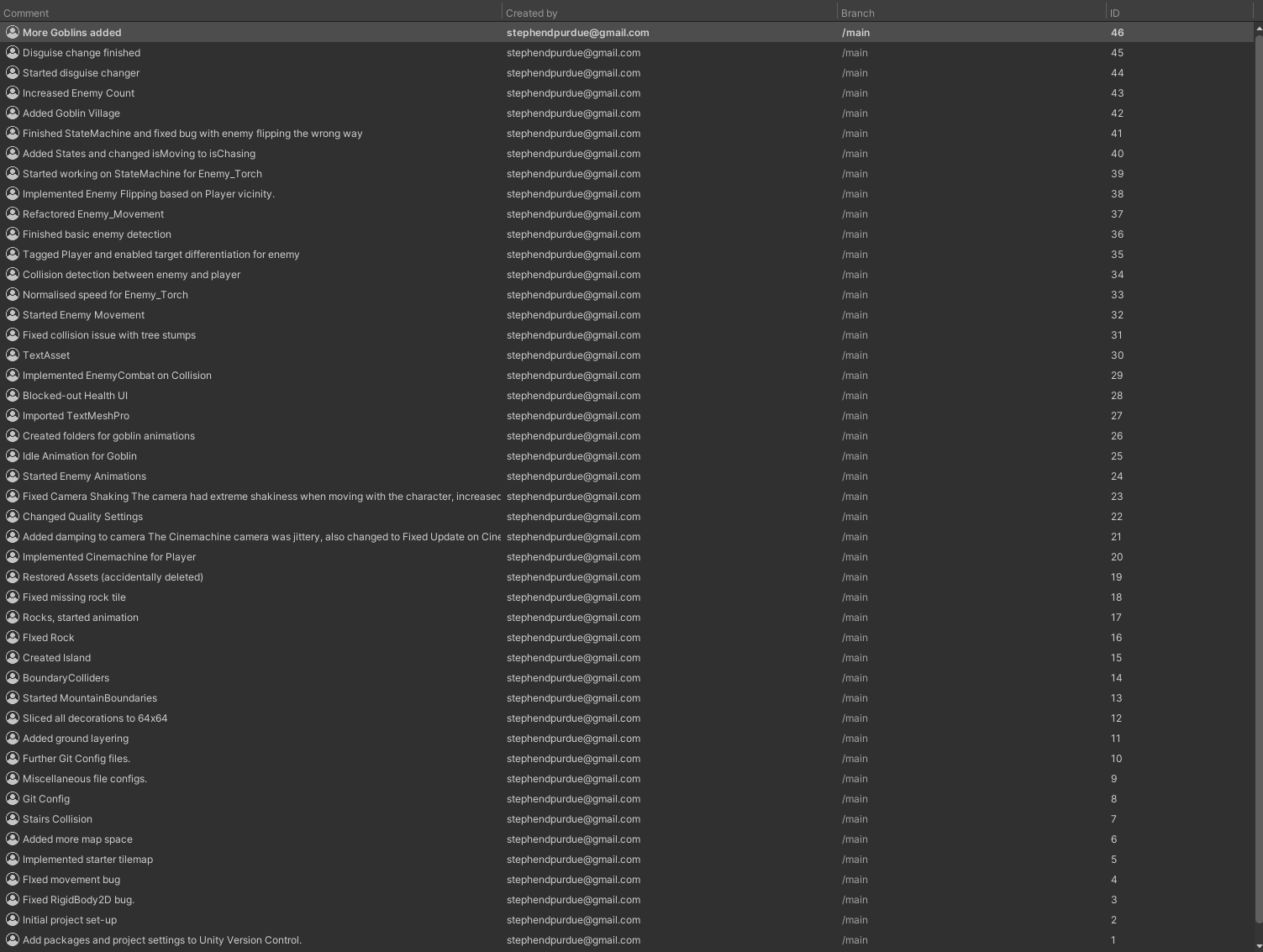
During Development, I used Unity Version Control to track and roll back changes. Should problems arise during the development cycle, more than 50 changes were logged, ranging from new systems to bug fixes. Documentation was kept within Unity, so detailed titles were used to outline changes.
World Building
When creating the environment, I chose to use a 2D tilemap. This was to keep the workflow manageable and remove the obstacle of having to create and reuse a large number of assets. This worked well for Slackers, as I was able to put more time into creating a polished mechanic, rather than a detailed environment.
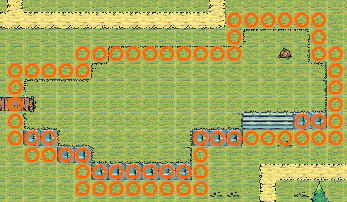
I chose to use Unity's tilemap system due to its simplicity and accessibility. Layers were created for Ground, Elevation, Interactive Objects, and Decorations, in order for collision to work correctly. The elevation was extremely simple, using a Tilemap Collider in order to detect player collision.
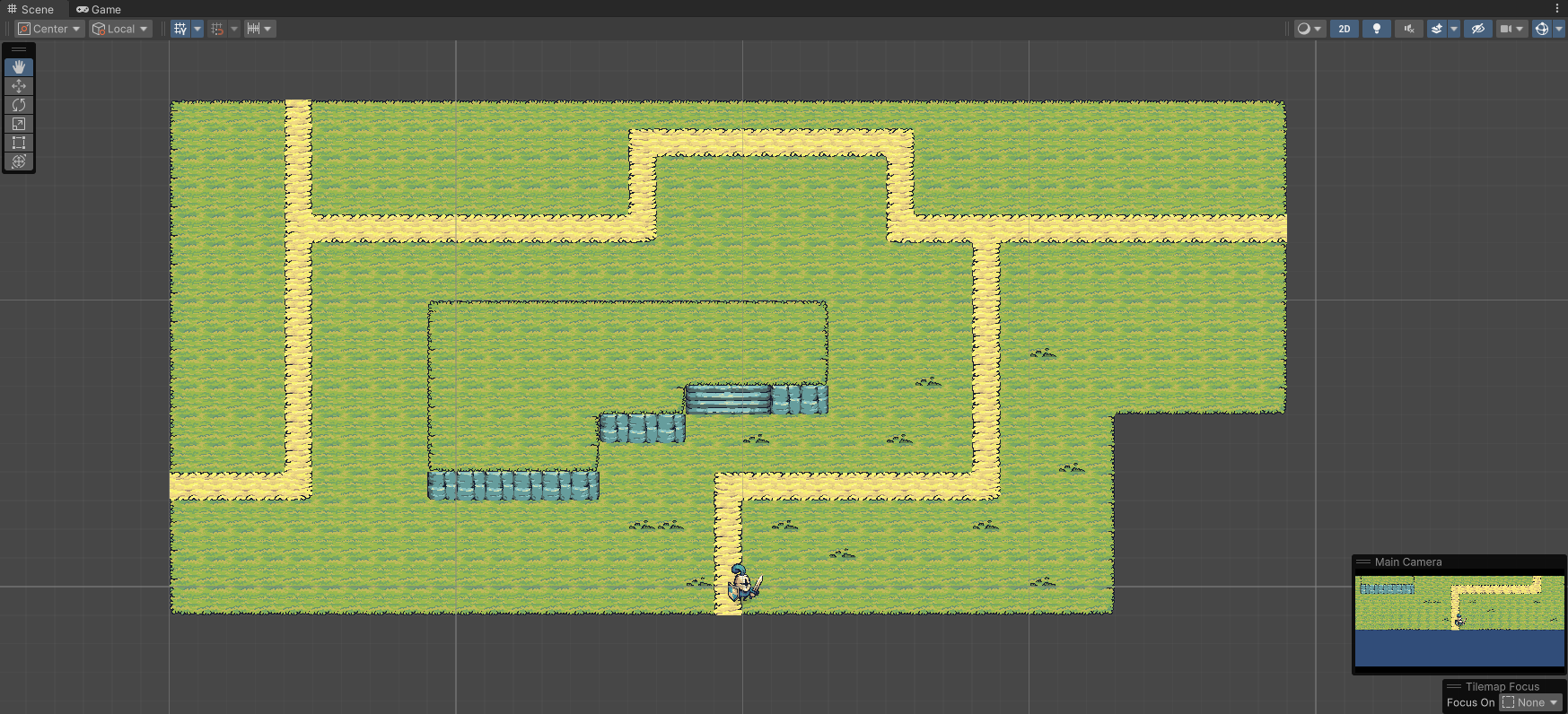
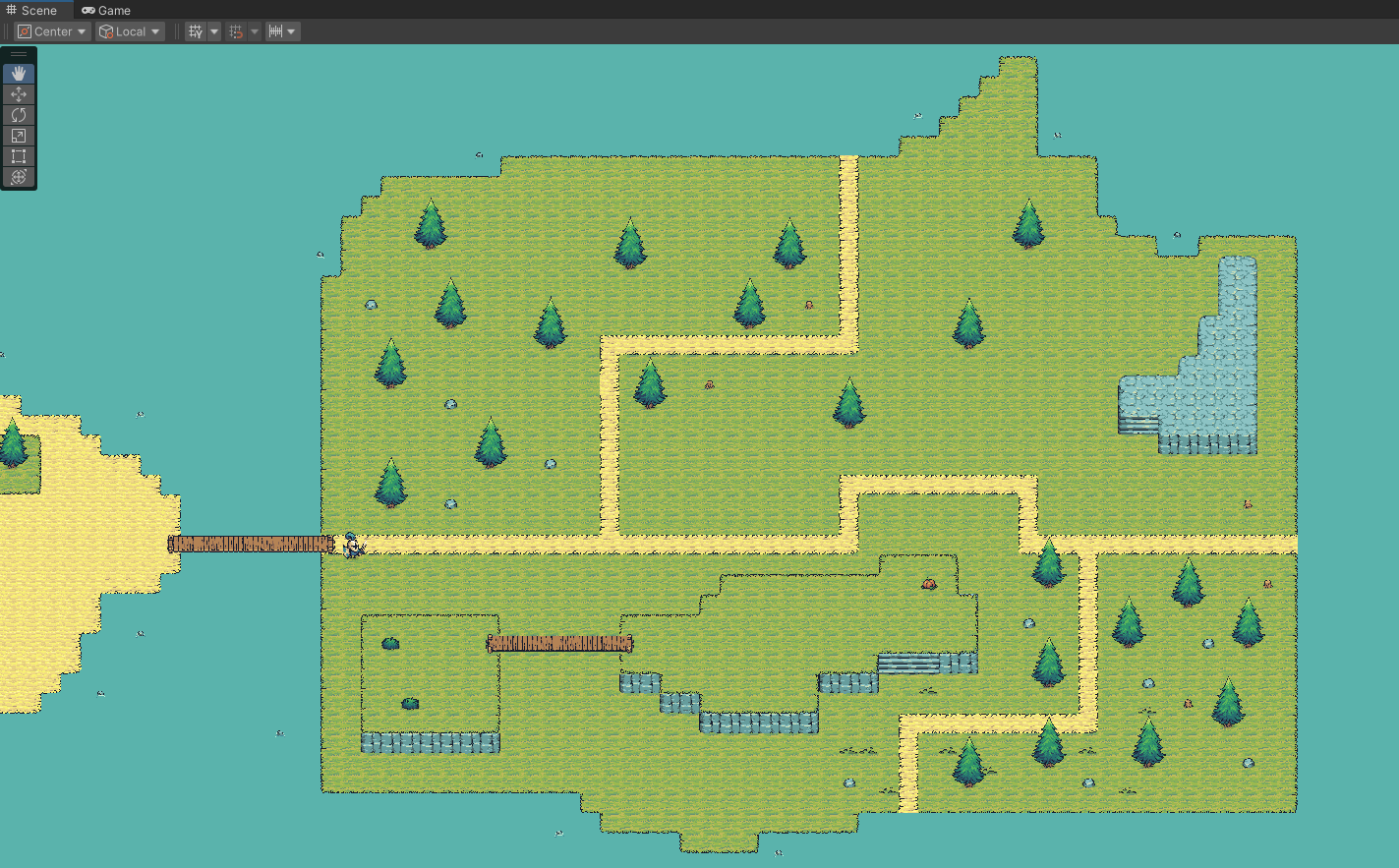
The first iteration featured an extremely open environment, prioritising a working environment to test player movement and collision. This evolved into a more functional world, with distinct zones. Zone-based architecture was key in providing spatial rhythm, alternating between quiet and exposed areas, creating tension and altering player movement. Decorations were left for later in the development cycle, as priority was placed on getting base mechanics working, rather than small details.
Future development would benefit from earlier paper prototyping before implementing a complete tilemap, as the redesign showed substantial wasted effort. The final environment successfully balances visual fidelity with gameplay opportunities and a zone-based approach.
Tilemap System
The environment's tilemap system required balancing visual depth and functional gameplay collision. This was implemented using Unity's tilemap layering system across eight distinct layers organised by rendering order.
- Water (-10): Background water decoration.
- Rocks (-2): Decorative rocks placed in the ocean.
- Ground (-1): Base floor tiles, no collision as a walkable surface.
- Non-Collision-Low (0): Decorative paths, plants, static objects.
- Collision-Low (0): Interactive obstacles using a Tilemap Collider 2D for player detection.
- Collision-High (10): Elevated terrain.
- Non-Collision-High (10): Decorative paths, plants, static objects on elevation.
- MountainBoundary (0): Outer boundary of mountains to prevent falling.
I faced a technical challenge with elevated terrain boundaries. Unity's automatic tilemap collider creates collision along tile edges, but doesn't inherently prevent players from moving from high to low elevation areas in the 2D top-down perspective.
Rather than solving this through configuring proper 2D physics, I implemented a basic workaround: manually placing invisible GameObject boxes with BoxCollider components attached; they were then made invisible to stop players from moving into void areas. This did, however, require placing each object manually, surrounding each elevated area. I chose to stick with this solution, as 'if it works and doesn't break, ship it'.
AI Detection System
Following the stealth system design principles identified during research, the implemented AI detection system focuses on balanced challenge and simplified mechanics, which are more appropriate for a polished vertical slice given the time constraints.
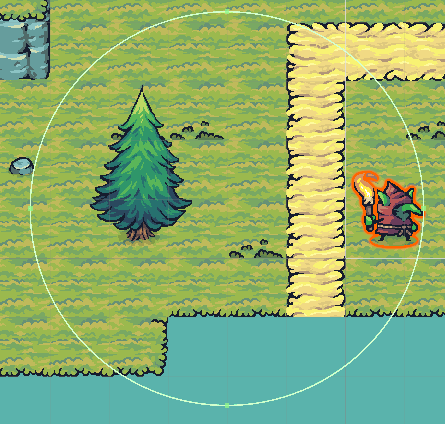
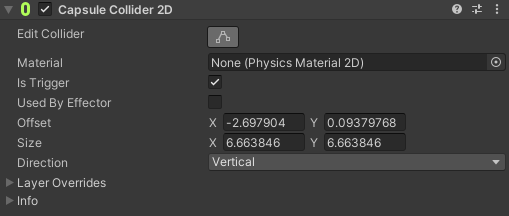
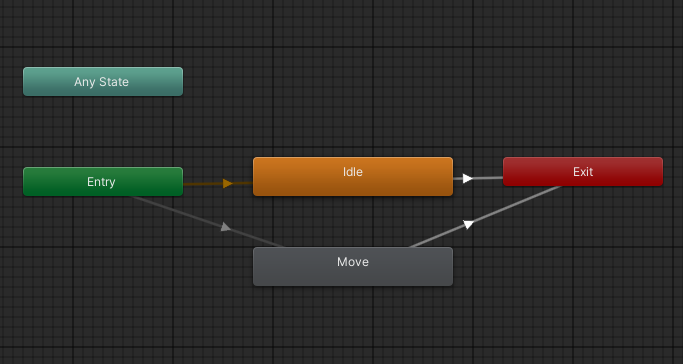
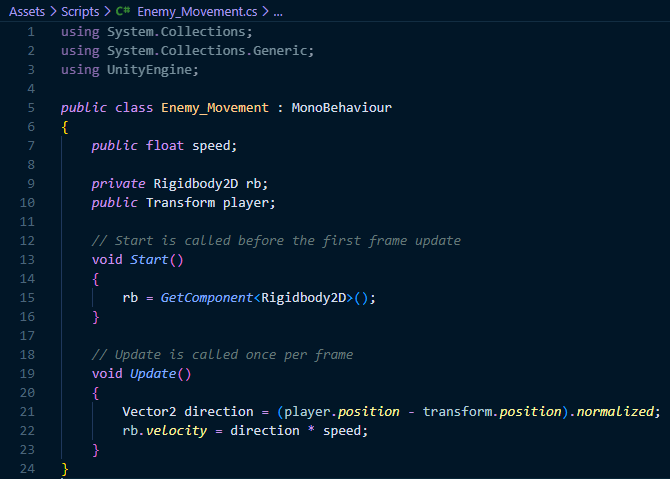
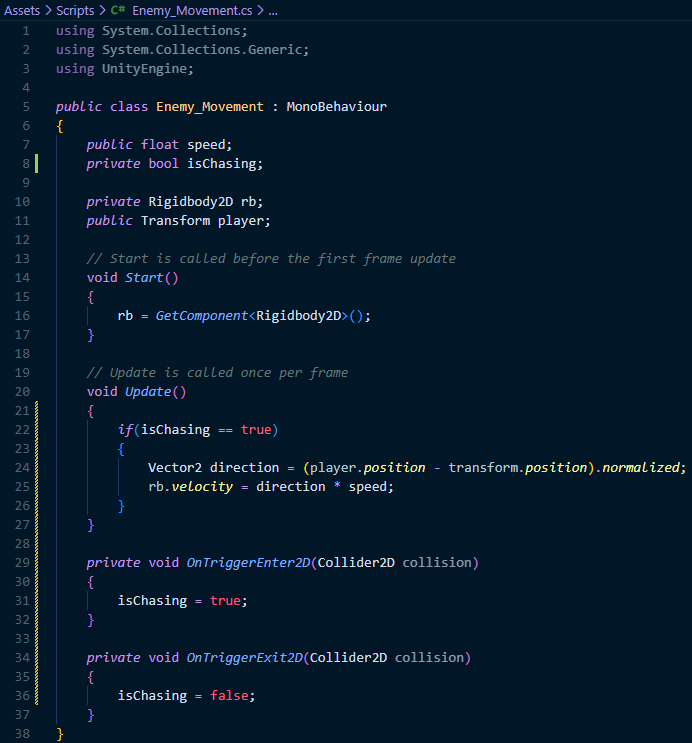
The AI detection system uses Unity's 2D trigger collision to create proximity-based chase behaviour. This favours simplicity over a more complex detection system. Each NPC possesses a CircleCollider2D trigger zone with a 4-meter radius outlining the detection range. When the player enters this area, OnTriggerEnter2D() executes, storing the player's transform reference and transitioning the NPC from Idle to Chasing via an enum-based state machine. During chase, FixedUpdate() calculates a direction vector from NPC to player and applies velocity to move towards the player. When starting, enemies were too fast and could outrun the player, causing an unfair scenario. Learning from this, I chose to set the default speed as 4 per second, so that the enemy is challenging, yet could be outrun. The NPC's sprite automatically flips based on the player's position to prevent it from facing the wrong direction. The initial attempts at creating this component were challenging and resulted in inverted flip logic, as each attempt at adding a new component to the script would cause it to start flipping to the wrong direction. This was fixed by hard-coding values so that it is facing either 1 or -1.
When the player exits the detection zone, OnTriggerExit2D() reduces the NPC's velocity to zero, clearing the player reference and returning to an Idle state. This is managed by Unity's animator component, with the ChangeState() method managing the animation boolean values: isIdle & isChasing. The isTrigger based approach provides clear detection for enemies, allowing them to remain idle or chase based on player proximity. When testing this system, the initial detection range was reduced from 7 to 4, as it was a bit too sensitive and would sometimes detect players before they were even on-screen.
Core Gameplay Mechanics
My interpretation of the brief involved creating an outdoor goblin mine working environment, under siege by a band of crusaders. I felt this worked extremely well with the chosen art style and brief, as it allowed me to create a basic environment and focus more on mechanics, rather than creating a detailed indoor office.
The disguise change mechanic is the game's primary stealth tool and directly links to the brief's core requirement for alien operatives to maintain cover while executing workplace sabotage. This system allows players to reset enemy detection states by changing character sprites at the 'Goblin Hut', providing a method of remaining anonymous. Rather than focus on creating multiple points, I chose to provide one disguise station and ensured that it was working properly.
.gif)
The disguise system runs through a static interaction point positioned close to the mine environment. When the character enters the huts four meter trigger radius, an on-screen prompt appears: 'Press [E] to Change Disguise'. Activating this triggers an instant sprite swap, cycling the player's sprite between one of three available outfits: the default Knight, a Goblin worker, and a Peasant Villager. Each is unique from the others, and provide choice when attempting to change disguise. Once the player activates the change, the player's SpriteRenderer is updated to the new sprite, and a reset command is sent to the Enemy_Movement script to reset their detection states.
Enemies that are currently chasing a player when a disguise change is activated are subject to an immediate state transition, their velocities are zeroed, and their state machines execute a forced return to the idle state. This creates a sense of awareness loss, allowing the player to resume as if they had never been spotted. I chose this way, rather than use gradual detection states, as it offers a consistent result that works every time.
In Conclusion, the disguise change mechanic is successful in providing a concrete system that addresses the brief's stealth requirements, because there is an on-screen prompt, players can use this to plan and change disguises as needed. For a vertical slice focused on polished mechanics done well rather than many mechanics done poorly, this is an excellent addition to the core gameplay loop.
Health System and UI
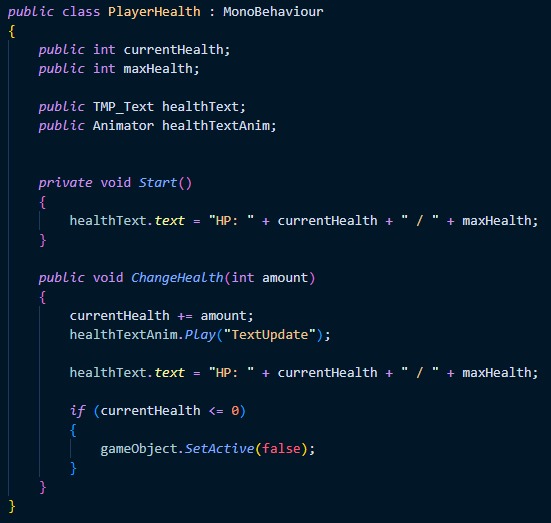
The health system and user interface were another key mechanic to be worked on. The health mechanics were created from scratch using the Player_Health and Enemy_Combat scripts.
To start, a RigidBody2D was added to the Enemy_Torch so that damage could be added on contact. In Player_Health, two variables were used to decide maxHealth and currentHealth; these were then called in a public variable called ChangeHealth, which detected any damage and changed health accordingly. It also set the Player GameObject to false when health reached 0. Enemy_Combat was extremely simple, declaring a public integer for damage and setting it to 1, and changing the collided player's health by -1 upon impact.
The UI was created using an Image Canvas, anchored to the top left of the screen. The sprite used was a horizontal banner image from the same asset pack. This was relatively easy to implement, simply requiring a reference in the PlayerHealth script, as well as an animation to add the 'bounce' effect upon health loss.
Character Animation
Each entity was animated using Unity's built-in animator tool, splicing each sprite's PNGs together and spreading them across 30 - 60 frames in order to create a Zelda-like animation. Each had two base animations: Idle and Running.
Bug Fixing
During development, one bug I faced early on was the main player character falling through the map after applying a RigidBody2D component. This was particularly frustrating, as it prevented any meaningful testing or progress, due to the character falling out of bounds. The default gravity scale was causing the character to fall quicker than the collision detection system could register contact with the ground, as well as the character's rotation not being constrained, causing unwanted rotation and tilting. However, it was an easy fix; in the Unity Inspector, the gravity scale was reduced to zero, and I also froze the z-rotation to prevent any unwanted rotation resulting from in-game actions.
Another bug was found during the creation of character movement. When the movement button was released, the character continued to move for a short time. This was fixed by changing Input.GetAxis to Input.GetAxisRaw. This worked because of Input.GetAxis tries to slow the movement gradually when using a lower gravity setting; the latter doesn't do this, allowing for the character to cease movement immediately upon button release.
Evaluation
The most significant limitation of this project was the absence of external evaluation and playtesting, which fundamentally undermined the ability to check design effectiveness and highlighted a critical failure, unlike in professional practice. While the developed prototype represents competent core systems, the lack of structured feedback leaves questions about player experience, design balance and accessibility unanswered.
Typically, professional game development requires external iterative playtesting throughout the development cycle, even for a slice of gameplay. For Slackers, this would have been conducted in multiple testing phases with data collection that could be analysed and actioned.
Early-stage testing should have involved prototype testing with 3-4 external participants to help validate the core loop. Questions would have been asked, such as: Do players understand the objective? Is there a balance between detection and anonymity? This would have helped with idea iteration before committing development time to specific areas.
Mid-stage testing would have required 6-8 participants and an evaluation of the whole prototype. Players would have been observed on how they interacted with the environment, difficult areas, and any bugs that appeared. Data would have been collected and then acted upon before moving into the polish / bug-fixing phase of development.
Late-stage testing would have involved beta testing with 10-20 participants to identify accessibility issues and bugs. Following typical game development practices, this data would have been used post-release, implementing fixes after launch.
While this is a significant gap in development, the technical skills gained during this project are invaluable (Animation, Scripting, Environment Design) and will help create a well-polished final project.
Final Word
The Slackers prototype successfully demonstrates the feasibility of chaos gameplay within the constraints of an MVP vertical slice. Through systematic iteration, the project delivers a working prototype that highlights mechanics required in the brief, combining 'sabotage' and 'stealth' systems in order to create engaging gameplay when properly balanced and designed. Working on this project in conjunction with RaRa Games this semester has been an invaluable experience, resulting in a full playable vertical slice. This opportunity allowed me to enhance my technical skills in environment creation, animation, and optimisation.
Primary strengths lie in project management and technical implementation. The Kanban methodology with Trello tracking allowed for organised development, prioritising MVP critical features while putting secondary elements on the backlog, to maintain effective time management. Zone-based environmental architecture creates strategic and tense gameplay, ensuring the player makes smart choices based on environmental hazards. Documentation practices, including a comprehensive Game Design Document and version control workflow, reflect industry standard practices and demonstrate professional development practices applicable to real projects.
While not all the mechanics were created, I am pleased that a polished chase and disguise mechanic could be created and implemented effectively, this does however link closely to the brief, by creating polished mechanics, rather than mediocre ones at an attempt to meet all the requirements. The experience gained from this project will feed directly into the final project for next semester, allowing me to create a full game rather than just a slice of gameplay.
References
United Nations (2025). Goal 12 | Ensure sustainable consumption and production patterns. [online] United Nations. Available at: https://sdgs.un.org/goals/goal12.
Radigan, D. (2024). What is Kanban? [online] Atlassian. Available at: https://www.atlassian.com/agile/kanban.
Hunicke, R., Leblanc, M. and Zubek, R. (2004). (PDF) MDA: A formal approach to game design and game research. [online] ResearchGate. Available at: https://www.researchgate.net/publication/228884866_MDA_A_Formal_Approach_to_Game_Design_and_Game_Research.
Schell, J. (2008). The Art of Game Design. [online] Available at: https://www.inventoridigiochi.it/wp-content/uploads/2020/07/art-of-game-design.pdf.
itch.io. (2026). Tiny Swords. [online] Available at: https://pixelfrog-assets.itch.io/tiny-swords?download
InnerSloth (2018) Among Us. InnerSloth. (Video Game)
Ghost Town Games (2016) Overcooked. Team17. (Video Game)
House House (2019) Untitled Goose Game. Panic. (Video Game)
Konami (1998) Metal Gear Solid. Konami (Video Game)
Bibliography
Unity Technologies (2019). Unity - Manual: Unity User Manual (2019.2). [online] Unity3d.com. Available at: https://docs.unity3d.com/Manual/index.html.
Unity Learn. (n.d.). Importing Assets. [online] Available at: https://learn.unity.com/tutorial/importing-assets.
Unity Learn. (2019). Unity Learn. [online] Available at: https://learn.unity.com/tutorial/animating-a-sprite-with-the-2d-animation-package
Unity Learn. (2019). Unity Learn. [online] Available at: https://learn.unity.com/tutorial/working-with-hexagonal-and-isometric-tile-shapes
Unity Learn. (2019). Unity Learn. [online] Available at: https://learn.unity.com/tutorial/introduction-to-tilemaps-2019-3
Unity Learn. (2019). Unity Learn. [online] Available at: https://learn.unity.com/tutorial/applying-2d-colliders-for-physics-interactions
Unity Learn. (2019). Unity Learn. [online] Available at: https://learn.unity.com/tutorial/controlling-unity-camera-behaviour-2019-3
Unity Learn. (n.d.). Beginner Scripting. [online] Available at: https://learn.unity.com/course/beginner-scripting.
itch.io. (n.d.). Pixel Frog. [online] Available at: https://pixelfrog-assets.itch.io/.
Haki (2023). Building a State Machine in Unity With C# - Haki - Medium. [online] Medium. Available at: https://medium.com/@jojackblack/building-a-state-machine-in-unity-with-c-b1c7c9c80a04.
Final Project
Semester 2 - 2026
Download
Open
Final Project
Semester 2 - 2026